Home/Reference Architecture/Pattern 1

Pattern 1

Multi-tenant SaaS, operated by Iron Fort

Nothing to deploy and nothing to operate. Iron Fort runs the platform in North American regions, and you connect your cloud accounts with read-only credentials. You are running a compliance programme the same week you sign up.

Talk to an architect Download the diagram
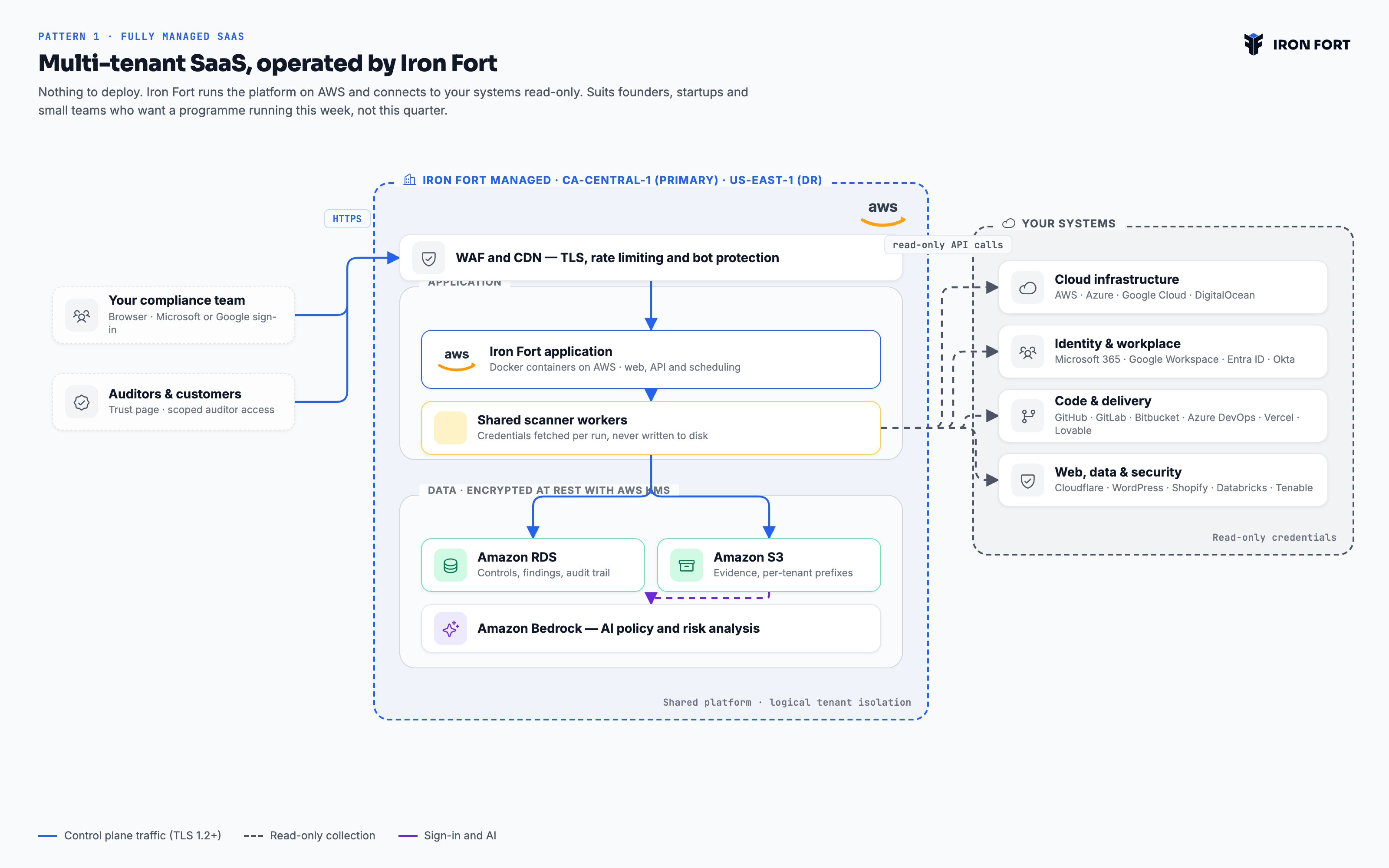
Multi-tenant SaaS, operated by Iron Fort — architecture diagram
Pattern 1 · Fully managed SaaS — Founders, startups and small businesses PNG, 3200×2000

What this pattern is

The platform is shared and multi-tenant, with isolation enforced at the application and data layer rather than by separate infrastructure. That is what makes it affordable at this size, and it is the right trade for a team whose alternative is a spreadsheet.

Applies to Founder and Startup plans. Every pattern runs the same platform — the same frameworks, the same evidence model and the same reports. What changes is who holds the infrastructure and where evidence comes to rest.

Deployment
Multi-tenant SaaS on AWS, operated by Iron Fort
Regions
ca-central-1 primary, us-east-1 for disaster recovery
You operate
Nothing
Isolation
Logical — per-tenant scoping and per-tenant storage prefixes
Evidence at rest
Amazon S3, encrypted with AWS KMS
Sign-in
Microsoft or Google, with two-factor enforced
Access
Published application behind a WAF, TLS 1.2+

From connection to evidence

Connect your systems

You grant read-only access across the nineteen supported integrations — a CloudFormation stack creates the cross-account role for AWS, an app registration covers Azure and Microsoft 365, and the rest connect by OAuth or service account.

Scans run on a schedule

Shared scanner workers pick up queued work and call your APIs read-only. Credentials are fetched per run and never written to disk.

Evidence lands and is filed

Findings go to the database, artefacts to Amazon S3 under a tenant-scoped prefix, each mapped to the control clause it answers.

You review and publish

Your team works in the app; auditors get scoped read-only access; customers get a public trust page.

How you would actually get here

Two plans, because they answer different questions and usually different people. Read them here, or take the PDF into your own planning.

Nothing is deployed and nothing is operated by you, so this plan is mostly about granting access carefully and deciding scope. Most of the work is in phases 2 and 3.

Before you start

  • A Microsoft or Google account for each person who needs access.
  • Administrative access to the cloud accounts and workspaces you want read.
  • Whoever can approve a CloudFormation stack in your AWS account.
1

Tenant and access

Iron Fort
  • We provision your tenant in ca-central-1 and confirm the region on the record.
  • You name the first administrators; sign-in is Microsoft or Google, with two-factor enforced.
  • Set roles now rather than later — administrator, contributor, read-only auditor.

Done whenYour administrators can sign in and see an empty but correctly scoped tenant.

2

Connect your systems

Together
  • AWS: deploy our published CloudFormation stack, which creates a read-only cross-account role with an external ID. Review it before you run it — it is short and it is meant to be read.
  • Azure and Microsoft 365: create an app registration with read scopes.
  • Google Cloud and Google Workspace: a service account with viewer roles.
  • GitHub, Vercel, Cloudflare, Okta and the rest: OAuth, read scopes only.

Done whenEvery in-scope system returns data on a test collection.

3

Scope the programme

Together
  • Record the organisation, its systems, departments and applications. This is what controls attach to.
  • Install the framework you need and choose a control profile.
  • Mark which systems hold regulated data — it drives most of the classification work later.

Done whenThe control set is installed and every control has a scope.

4

First collection

Iron Fort
  • Scans run on schedule; the first full pass establishes a baseline.
  • We walk the initial findings with you and separate real gaps from scoping errors.
  • Assign owners to findings so the queue belongs to people, not to the platform.

Done whenA coverage figure exists and the team agrees it is honest.

5

Policies and evidence

You
  • Bulk-upload the policies you already have; each is parsed, matched to the framework and shown to you before anything is saved.
  • Fill the gaps from the policy library rather than from scratch.
  • Set review cycles so the clock starts running now.

Done whenEvery required policy exists, has an owner and has a next review date.

6

Reporting and trust

Together
  • Schedule the recurring reviews: access recertification, risk assessment, DR test, penetration test.
  • Generate the reports your assessor expects and read them before they do.
  • Publish the trust page and take the embed badge for your own footer.

Done whenYou can hand an assessor a link and a report pack on the same day they ask.

Sequence, not schedule. Phases are ordered by dependency. Elapsed time depends on your change process and scope, so we do not guess at it — ask us and we will estimate against your specifics.

The platform is running from day one, so adoption is entirely about people. The risk here is not technical failure — it is a tool that one person uses and nobody else opens.

1

Give it an owner

You
  • Name one person accountable for the programme. Not a committee — programmes with three owners have none.
  • Name control owners per domain: access, change, backup, vendor, training. These are the people who will be asked for evidence.
  • Agree who signs off a policy and who accepts a risk. Write both down before you need them.

Done whenEvery control set in scope has a named owner who knows they own it.

2

Pilot on one framework

Together
  • Pick the framework you are actually being asked for. Adding a second later reuses this work; starting with two doubles the argument about scope.
  • Run a gap analysis and accept that the first number will be low. It is a baseline, not a grade.
  • Work the top ten gaps only. Breadth comes after the team believes the tool.

Done whenOne framework has a real coverage figure the owner recognises as true.

3

Bring in the control owners

You
  • Walk each owner through their own controls, not the whole platform. Fifteen minutes each beats one hour-long all-hands.
  • Show them the evidence request queue and how to close an item.
  • Set the expectation that evidence is filed when the work happens, not the week before an audit.

Done whenOwners are closing their own evidence requests without being chased.

4

Set the rhythm

You
  • Put policy reviews, access recertification and risk assessment on the schedule with real dates.
  • Agree a monthly half-hour where the owner reviews coverage and overdue items. Short and regular beats long and quarterly.
  • Turn on notifications for expiring evidence, so the system chases instead of a person.

Done whenA month passes with no manual chasing and nothing falls overdue.

5

Open it outward

Together
  • Publish the trust page and put the link where sales can reach it.
  • Give your assessor scoped read-only access rather than exporting a folder of screenshots.
  • Generate the reports your auditor asks for and check they say what you expect before the audit, not during it.

Done whenA customer security questionnaire is answered with a link.

6

Add the second framework

Together
  • Install it and let the overlap map itself against the evidence you already hold.
  • Work only the delta. This is where the platform pays for itself, and the team will feel it.
  • Review the control profile: comprehensive where it matters, lighter where it does not.

Done whenThe second framework reaches useful coverage in a fraction of the first one's effort.

Sequence, not schedule. Phases are ordered by dependency. Elapsed time depends on your change process and scope, so we do not guess at it — ask us and we will estimate against your specifics.

Is this the right pattern?

We would rather send you to another pattern than sell you the wrong one.

Choose this when

  • You want a programme running now, not after an infrastructure project.
  • Your data is already in a public cloud, and North American residency is acceptable.
  • You are chasing a first SOC 2 or HIPAA attestation and time matters more than tenancy.

Look elsewhere when

  • Your policy forbids evidence leaving accounts you control — see Pattern 3.
  • Procurement requires single-tenant infrastructure — see Pattern 2.
  • You have a data-residency or sovereignty obligation we cannot meet from North America — see Pattern 4.

Compare

Bring us your constraints.

Residency, tenancy, egress, air gap — tell us the rule you have to satisfy and we will show you the deployment that satisfies it.

Book an architecture call All four patterns