Home/Reference Architecture/Pattern 4 · Enterprise C

Pattern 4 · Enterprise C

The whole platform, inside your perimeter

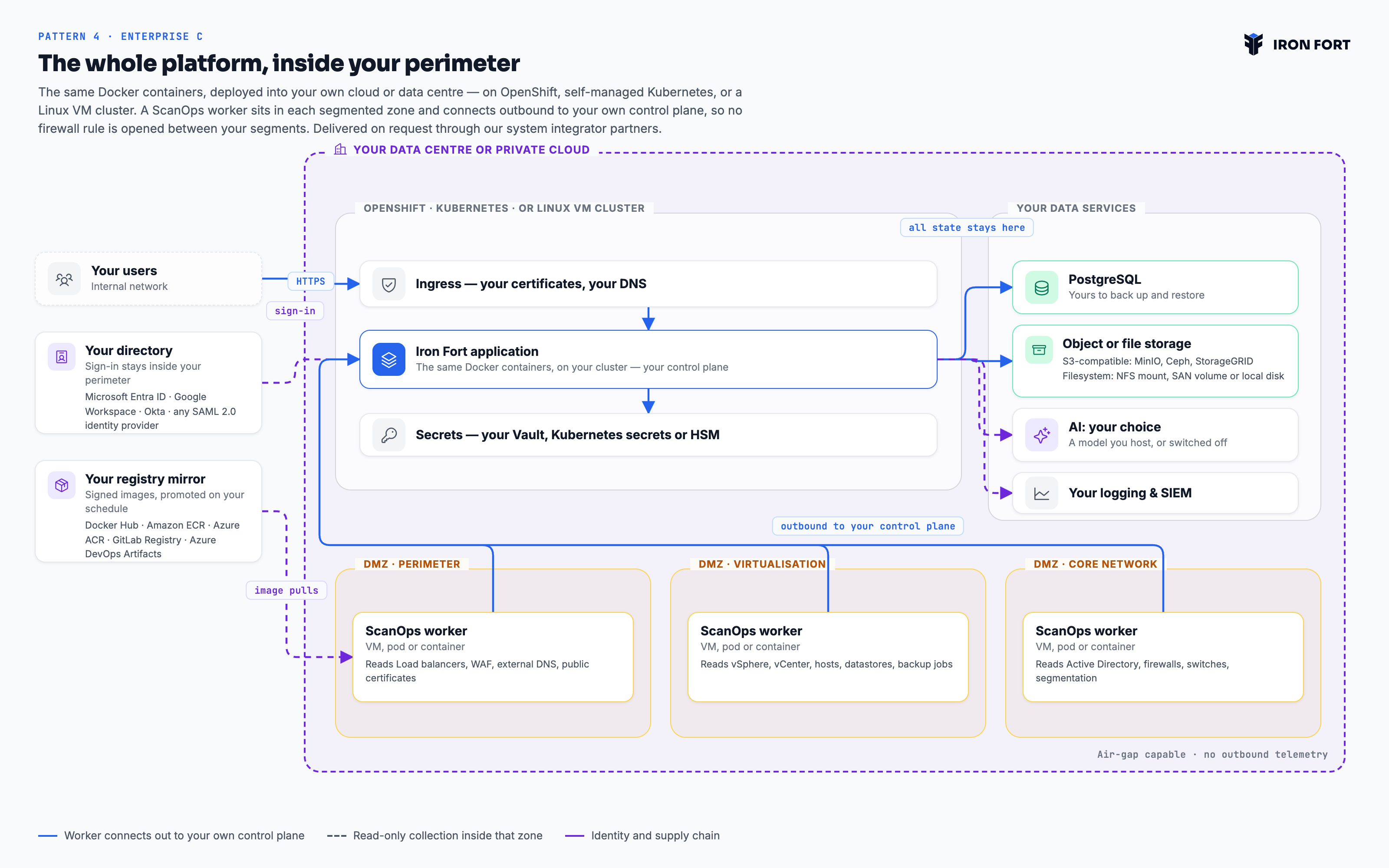
The same Docker containers, deployed into your own cloud or data centre — on OpenShift, self-managed Kubernetes, or a Linux VM cluster. A ScanOps worker sits in each segmented zone and connects outbound to your own control plane. Every component, every byte of state, inside your perimeter. Available today, delivered on request through our system integrator partners.

Talk to an architect Download the diagram
The whole platform, inside your perimeter — architecture diagram
Pattern 4 · Enterprise C · On-premises and private deployment — Sovereign, air-gapped and regulated on-premises estates PNG, 3200×2000

What this pattern is

No part of the deployment calls home. Updates arrive as signed images you promote through your own registry on your own schedule, which is what makes an air-gapped installation possible rather than merely claimed. An on-premises estate is rarely one flat network, so each segmented zone gets its own DMZ and its own collector: the core cluster cannot reach across a firewall boundary any more than we could from outside it. This is also the one pattern where sign-in can point at a directory inside your perimeter — Entra ID, Google Workspace, Okta or any SAML 2.0 provider — because a disconnected site cannot reach Microsoft or Google over the internet.

Applies to Enterprise plans. Every pattern runs the same platform — the same frameworks, the same evidence model and the same reports. What changes is who holds the infrastructure and where evidence comes to rest.

Deployment
Docker containers you run: OpenShift, Kubernetes, or Linux VM clusters
Availability
Available today, implemented on request by our system integrator partners
Regions
Wherever your data centre is
You operate
Everything — the platform, the database, the object store, the secrets
Collection
One ScanOps worker per DMZ or segmented zone, each connecting outbound to your own control plane
Worker runtime
A VM, a Kubernetes pod, or a plain container
Isolation
Complete. Nothing leaves your perimeter
Evidence at rest
Your PostgreSQL, plus an S3-compatible store (MinIO, Ceph, StorageGRID) or simply a mounted filesystem — an NFS mount, a SAN volume or local disk
Sign-in
Microsoft Entra ID, Google Workspace, Okta, or any SAML 2.0 identity provider
Container images
Docker Hub, Amazon ECR, Azure ACR, GitLab Registry or Azure DevOps Artifacts
Access
Your ingress, your certificates, your network

From connection to evidence

You pull signed images

Into whichever registry you already run — Docker Hub, Amazon ECR, Azure ACR, GitLab Registry or Azure DevOps Artifacts — and promote them on your own schedule. Air-gapped installations transfer them through your existing media process.

You deploy the stack

The application and scanner worker containers, with your secrets backend — by Helm chart or Operator, or as systemd units on a VM cluster. Our system integrator partners do this work if you would rather they did.

You wire in your own services

PostgreSQL, storage for evidence — an S3-compatible object store, or a mounted filesystem on NFS or a SAN volume if you would rather not run object storage — your secrets manager and your SIEM. Sign-in goes to Microsoft Entra ID, Google Workspace, Okta or any SAML 2.0 provider you already run. AI analysis runs against Bedrock over PrivateLink, a model you host, or is switched off entirely.

A worker in each zone

One ScanOps worker per DMZ or segmented network — perimeter, virtualisation, core network, or however your estate is divided. Each reads only its own zone and connects outbound to your own control plane, so no firewall rule has to be opened between your segments.

How you would actually get here

Two plans, because they answer different questions and usually different people. Read them here, or take the PDF into your own planning.

You run everything, so this reads more like a platform deployment than a SaaS onboarding. Our system integrator partners do this work on request. Sequence matters more here than anywhere else: the supply chain and the directory have to be settled before anything useful can be deployed.

Before you start

  • A target platform: OpenShift, self-managed Kubernetes, or a Linux VM cluster.
  • A registry you already run — Docker Hub, Amazon ECR, Azure ACR, GitLab Registry or Azure DevOps Artifacts.
  • A directory: Microsoft Entra ID, Google Workspace, Okta, or any SAML 2.0 provider.
  • PostgreSQL, and storage for evidence — object or filesystem.
  • A named platform team, or an engagement with one of our system integrator partners.
1

Supply chain

You
  • Mirror our signed images into your registry and verify the signatures.
  • Agree the promotion path: who moves an image from staging to production, and on what schedule.
  • For air-gapped estates, confirm the media transfer process before you need it. This is the step that surprises people.

Done whenImages are in your registry and you can reproduce the pull without us.

2

Data services and identity

You
  • Provision PostgreSQL with your own backup and restore process — and test the restore.
  • Provision evidence storage: an S3-compatible object store, or simply a mounted filesystem on NFS, a SAN volume or local disk.
  • Configure sign-in against your directory over SAML 2.0 or OIDC. A disconnected site cannot reach Microsoft or Google, which is why this is the one pattern where the directory is yours.

Done whenA test user signs in against your directory and the database survives a restore drill.

3

Deploy the platform

Together
  • Deploy the application containers by Helm chart or Operator, or as systemd units on a VM cluster.
  • Wire in your secrets backend — Vault, Kubernetes secrets or an HSM.
  • Point ingress at your own certificates and DNS. Nothing about this deployment reaches outside your perimeter.

Done whenThe application is reachable internally and holds no configuration that points outward.

4

Map the network zones

You
  • List the segmented zones that need collecting: perimeter, virtualisation, core network, and whatever else your estate is divided into.
  • For each, decide the worker runtime — a VM, a pod or a container — and who owns it.
  • Confirm each zone can reach the control plane. That single egress rule is what removes the need to open firewalls between segments.

Done whenA zone map exists with an owner and a runtime per zone.

5

Deploy the workers

Together
  • Deploy a ScanOps worker into a DMZ in each zone, starting with the least sensitive.
  • Give each read-only credentials scoped to its own zone and nothing else.
  • Confirm each connects out to your control plane, and that collection covers what the zone owner expects.

Done whenEvery zone on the map is collecting.

6

Operate it

You
  • Ship logs to your SIEM and add the platform to your existing monitoring.
  • Add it to your patch and upgrade cycle. You control when versions land, which is the point — and also the obligation.
  • Run a restore drill and a worker-failure drill before you depend on either.

Done whenThe platform is in your runbooks and your on-call rota like any other internal service.

Sequence, not schedule. Phases are ordered by dependency. Elapsed time depends on your change process and scope, so we do not guess at it — ask us and we will estimate against your specifics.

You have two audiences here, not one: the platform team who now operate a service, and the compliance team who use it. Plan for both, or the platform team will treat it as an orphan and the compliance team will not trust its uptime.

1

Hand it to the platform team properly

You
  • Run a handover: architecture, upgrade path, failure modes, restore procedure.
  • Put it in the on-call rota and the runbook set. An internal service with no owner degrades quietly.
  • Agree the upgrade cadence with the compliance team, so a framework update is not blocked by a version freeze nobody discussed.

Done whenThe platform team can upgrade and restore it without calling anyone.

2

Give it an owner

You
  • Name one person accountable for the programme. Not a committee — programmes with three owners have none.
  • Name control owners per domain: access, change, backup, vendor, training. These are the people who will be asked for evidence.
  • Agree who signs off a policy and who accepts a risk. Write both down before you need them.

Done whenEvery control set in scope has a named owner who knows they own it.

3

Pilot on one framework

Together
  • Pick the framework you are actually being asked for. Adding a second later reuses this work; starting with two doubles the argument about scope.
  • Run a gap analysis and accept that the first number will be low. It is a baseline, not a grade.
  • Work the top ten gaps only. Breadth comes after the team believes the tool.

Done whenOne framework has a real coverage figure the owner recognises as true.

4

Bring in the control owners

You
  • Walk each owner through their own controls, not the whole platform. Fifteen minutes each beats one hour-long all-hands.
  • Show them the evidence request queue and how to close an item.
  • Set the expectation that evidence is filed when the work happens, not the week before an audit.

Done whenOwners are closing their own evidence requests without being chased.

5

Set the rhythm

You
  • Put policy reviews, access recertification and risk assessment on the schedule with real dates.
  • Agree a monthly half-hour where the owner reviews coverage and overdue items. Short and regular beats long and quarterly.
  • Turn on notifications for expiring evidence, so the system chases instead of a person.

Done whenA month passes with no manual chasing and nothing falls overdue.

6

Open it outward

Together
  • Publish the trust page and put the link where sales can reach it.
  • Give your assessor scoped read-only access rather than exporting a folder of screenshots.
  • Generate the reports your auditor asks for and check they say what you expect before the audit, not during it.

Done whenA customer security questionnaire is answered with a link.

7

Add the second framework

Together
  • Install it and let the overlap map itself against the evidence you already hold.
  • Work only the delta. This is where the platform pays for itself, and the team will feel it.
  • Review the control profile: comprehensive where it matters, lighter where it does not.

Done whenThe second framework reaches useful coverage in a fraction of the first one's effort.

Sequence, not schedule. Phases are ordered by dependency. Elapsed time depends on your change process and scope, so we do not guess at it — ask us and we will estimate against your specifics.

Is this the right pattern?

We would rather send you to another pattern than sell you the wrong one.

Choose this when

  • Sovereignty, classification or contract requires everything inside your perimeter.
  • The estate is air-gapped, or partially so.
  • Most of what you need evidence for is not in a public cloud at all.

Look elsewhere when

  • You have no platform team and no integrator — Pattern 2 gives you dedicated infrastructure without the operational load.
  • You want upgrades handled for you.

Compare

Bring us your constraints.

Residency, tenancy, egress, air gap — tell us the rule you have to satisfy and we will show you the deployment that satisfies it.

Book an architecture call All four patterns