Home/Reference Architecture/Pattern 3 · Enterprise B

Pattern 3 · Enterprise B

A DMZ and a worker in every environment. Evidence stays where it lands.

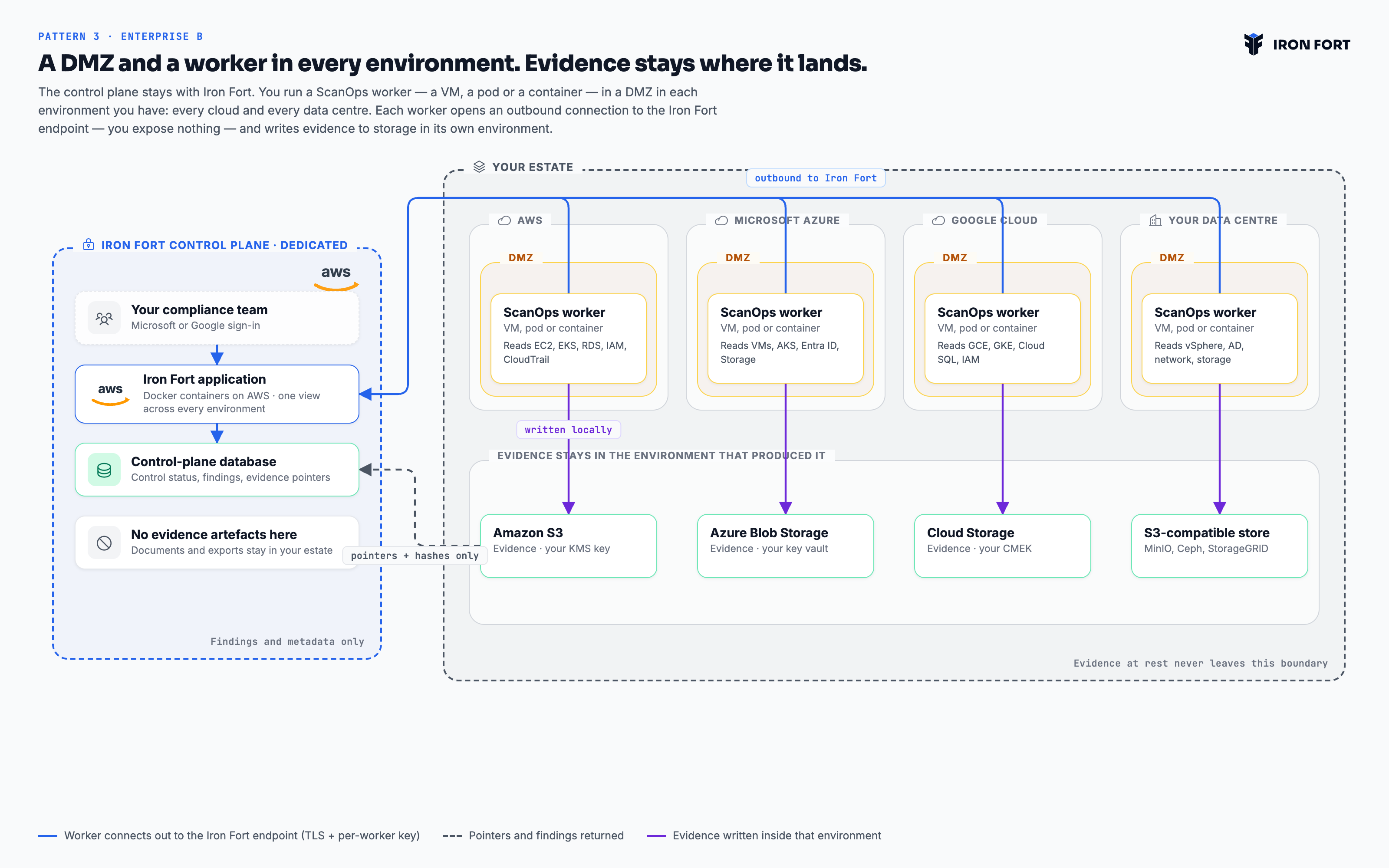
The control plane stays with Iron Fort, dedicated to you as in Pattern 2. Collection moves into your estate: a ScanOps worker — a VM, a pod or a container — running in a DMZ in every environment you have, across AWS, Azure, Google Cloud and your own data centres.

Talk to an architect Download the diagram
A DMZ and a worker in every environment. Evidence stays where it lands. — architecture diagram
Pattern 3 · Enterprise B · Distributed workers across your estate — Multi-cloud enterprises with residency or egress constraints PNG, 3200×2000

What this pattern is

Iron Fort holds findings, control status and pointers — the artefacts themselves stay where they were collected, under your key and your retention policy. Each worker opens an outbound connection to the Iron Fort endpoint over TLS, authenticated with a key unique to it — nothing is initiated from our side, so you expose no endpoint and write no inbound rule. Every environment keeps its own DMZ and its own collector, and one control plane still shows the whole estate as a single programme.

Applies to Enterprise plans. Every pattern runs the same platform — the same frameworks, the same evidence model and the same reports. What changes is who holds the infrastructure and where evidence comes to rest.

Deployment
Dedicated Iron Fort control plane on AWS. One worker per environment, hosted by you
Environments
AWS, Microsoft Azure, Google Cloud and your own data centres, side by side
You operate
A DMZ and a ScanOps worker in each environment, plus the storage it writes to
Isolation
Dedicated control plane, plus evidence never leaving the environment that produced it
Evidence at rest
Amazon S3, Azure Blob Storage, Google Cloud Storage or an S3-compatible store on-premises — your keys, your retention
Sign-in
Microsoft or Google, with two-factor enforced
Worker runtime
A VM, a Kubernetes pod, or a plain container — whichever that environment already runs
Access
Outbound only — each worker connects out to the Iron Fort endpoint over TLS with a key unique to it. No inbound path into your network is required

From connection to evidence

A DMZ and a worker in every environment

One per cloud account and one per data centre. The ScanOps worker runs however that environment already runs things — a VM, a Kubernetes pod, or a container — in your subnet, your security group. We publish the image; you decide what it can reach and what it may not.

Each worker connects out to Iron Fort

The worker opens the connection to the Iron Fort endpoint over TLS, with a key unique to it. Nothing is ever initiated from our side, so there is no inbound rule to write and no endpoint of yours to expose. Keys are stored encrypted, and the control plane knows nothing about the inside of your network beyond what the worker tells it.

Collection stays where it happens

On our call, the worker reads that environment from inside it — EC2 and IAM on AWS, VMs and Entra ID on Azure, GKE and Cloud SQL on Google Cloud, vSphere and Active Directory in the data centre — and writes artefacts to storage in that same environment.

Only findings come back

The control plane receives control status, findings and content hashes with pointers to where each artefact lives. The artefacts themselves never transit to us.

How you would actually get here

Two plans, because they answer different questions and usually different people. Read them here, or take the PDF into your own planning.

The control plane is built as in Pattern 2. The difference is that you run a collector in every environment you have, and you provide the storage it writes to. Plan this per environment rather than as one project — each has its own network owner and its own change window.

Before you start

  • An inventory of every environment in scope: cloud accounts and data centres alike.
  • For each, a network owner who can place a workload in a DMZ and allow its egress.
  • For each, storage you control — object storage or a filesystem — and the key that protects it.
1

Inventory the estate

Together
  • List every environment: AWS accounts, Azure subscriptions, Google Cloud projects, data centres.
  • For each, name the network owner and the storage it will write to.
  • Decide what is genuinely in scope. Every environment you add is a worker to run, so scope honestly rather than exhaustively.

Done whenA list of environments, each with an owner, a runtime and a storage target.

2

Control plane

Iron Fort
  • We build your dedicated control plane as in Pattern 2, with the same allowlist and sign-in.
  • Register each planned worker and issue a key unique to it.
  • Confirm no evidence artefact will be stored here — only findings, status and pointers.

Done whenThe control plane is reachable and every worker has an identity.

3

First worker, one environment

Together
  • Deploy a ScanOps worker into a DMZ in your least sensitive environment first — a VM, a Kubernetes pod, or a plain container, whichever that environment already runs.
  • Give it read-only credentials for that environment and a path to its storage.
  • Confirm it connects out to the Iron Fort endpoint successfully, and that evidence lands in your storage, not ours.

Done whenOne environment collects end to end, and you can point at where the evidence sits.

4

Roll out the remaining environments

You
  • Repeat per environment. The pattern is identical; the network conversation is not, so allow for each one separately.
  • Keep keys distinct per worker. A shared key removes the only thing that tells two environments apart.
  • Set retention and legal hold on each storage target — they are yours to set and yours to defend.

Done whenEvery environment on the inventory is collecting.

5

Scope, collect, populate

Together
  • Record the organisation and its systems across all environments; install the framework.
  • Run the first full collection and reconcile findings against what each environment owner expects.
  • Bulk-upload existing policies and set review cycles.

Done whenOne coverage figure spans the whole estate, and each environment owner recognises their part of it.

6

Prove the boundary

Together
  • Walk your security team through an evidence item end to end: where it was collected, where it is stored, what left the environment.
  • Document the answer. This is the artefact that satisfies the residency question in future reviews.
  • Schedule recurring reviews and generate the first assessor report pack.

Done whenYour security team has signed off the data-flow, in writing.

Sequence, not schedule. Phases are ordered by dependency. Elapsed time depends on your change process and scope, so we do not guess at it — ask us and we will estimate against your specifics.

This pattern has more owners than the others, because each environment brings its own network and platform team. Adoption succeeds or fails on whether those teams see the worker as theirs.

1

Get the environment owners on side first

You
  • Talk to each network and platform owner before anything is deployed. A collector arriving unannounced in a DMZ starts an argument you do not need.
  • Show them what the worker reads and what it cannot. Read-only is the whole answer, so lead with it.
  • Agree who patches and restarts the worker in each environment. It is a workload you now run.

Done whenEvery environment owner has agreed to host a worker and knows what it does.

2

Give it an owner

You
  • Name one person accountable for the programme. Not a committee — programmes with three owners have none.
  • Name control owners per domain: access, change, backup, vendor, training. These are the people who will be asked for evidence.
  • Agree who signs off a policy and who accepts a risk. Write both down before you need them.

Done whenEvery control set in scope has a named owner who knows they own it.

3

Pilot on one framework

Together
  • Pick the framework you are actually being asked for. Adding a second later reuses this work; starting with two doubles the argument about scope.
  • Run a gap analysis and accept that the first number will be low. It is a baseline, not a grade.
  • Work the top ten gaps only. Breadth comes after the team believes the tool.

Done whenOne framework has a real coverage figure the owner recognises as true.

4

Bring in the control owners

You
  • Walk each owner through their own controls, not the whole platform. Fifteen minutes each beats one hour-long all-hands.
  • Show them the evidence request queue and how to close an item.
  • Set the expectation that evidence is filed when the work happens, not the week before an audit.

Done whenOwners are closing their own evidence requests without being chased.

5

Set the rhythm

You
  • Put policy reviews, access recertification and risk assessment on the schedule with real dates.
  • Agree a monthly half-hour where the owner reviews coverage and overdue items. Short and regular beats long and quarterly.
  • Turn on notifications for expiring evidence, so the system chases instead of a person.

Done whenA month passes with no manual chasing and nothing falls overdue.

6

Open it outward

Together
  • Publish the trust page and put the link where sales can reach it.
  • Give your assessor scoped read-only access rather than exporting a folder of screenshots.
  • Generate the reports your auditor asks for and check they say what you expect before the audit, not during it.

Done whenA customer security questionnaire is answered with a link.

7

Add the second framework

Together
  • Install it and let the overlap map itself against the evidence you already hold.
  • Work only the delta. This is where the platform pays for itself, and the team will feel it.
  • Review the control profile: comprehensive where it matters, lighter where it does not.

Done whenThe second framework reaches useful coverage in a fraction of the first one's effort.

Sequence, not schedule. Phases are ordered by dependency. Elapsed time depends on your change process and scope, so we do not guess at it — ask us and we will estimate against your specifics.

Is this the right pattern?

We would rather send you to another pattern than sell you the wrong one.

Choose this when

  • A data-residency, sovereignty or egress rule means evidence cannot leave the environment it came from.
  • Your estate spans more than one cloud, or mixes cloud and data centre, and you want one view of it.
  • You want retention, legal hold and deletion to stay under your own key and policy.
  • Your security team will not open an inbound path for a vendor — this pattern needs none. Every worker connects outbound.
  • You can run a small collector in each environment and are comfortable operating it.

Look elsewhere when

  • You do not want to run any Iron Fort component at all — see Pattern 1 or 2.
  • Even a vendor-hosted control plane is unacceptable — see Pattern 4.

Compare

Bring us your constraints.

Residency, tenancy, egress, air gap — tell us the rule you have to satisfy and we will show you the deployment that satisfies it.

Book an architecture call All four patterns